Your next LMS admin task starts with a sentence
How we turned Kiki into an admin tool that lets you state the outcome you want, check the changes and approve them in one flow

.png)
Admins spend hours on tasks that they could describe in a single sentence – so we built a way for them to do exactly that.
Software has changed dramatically over the last 20 years. User interfaces (UI) have become sophisticated, involving design and user behaviour analysis (UX) before getting into production. A whole new language has evolved based on the field of UI/UX:
- User Journey
- Progressive disclosure
- Discoverability
AI-based chat represents a new interface into software: one that, in many ways, is worse than a user interface.
A typical AI chat interface is user-driven, requiring users to type in text as the means of getting a response. As a result of this, it’s poor at allowing users to discover and explore when compared to the richness of a UI. It is, however, excellent at enabling users to achieve tasks – when those users know what they want to achieve.
This is the starting point for this blog’s argument:
Platform management tasks are labour intensive and follow a fixed structure. That means you can complete them in chat faster, using a smaller set of UI components than a traditional interface needs.
What we actually built
We turned our AI assistant Kiki into an admin tool for platform management.
With this update, we wanted to help admins complete real tasks faster by letting them state what they want in the chat, audit potential changes, and approve.
Some examples:
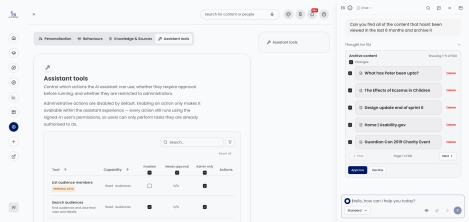
- Find stale or unviewed content -> review results -> archive with approval
- Find inactive users -> inspect the set -> suspend or disable with approval
- build or update audiences -> search -> inspect -> change
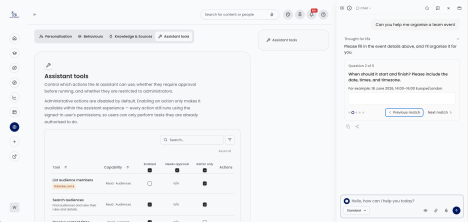
- organise a team event -> ask clarifying questions -> create the event
Why admin tasks are a special case
For complex admin tasks, it’s often faster to type the outcome you want than to remember which screen, filter, bulk action, and confirmation flow gets you there.
More importantly, admin work is usually set-based.
A typical admin workflow is not:
- Open one record
- Edit one record
- Save one record
Instead, it much more often looks like:
- Discover a set
- Narrow the set
- Inspect the set
- Select some or all of the set
- Approve a mutation over the set
- Review the result and audit trail
With this set-based framing, the UI requirements followed. Free text is good for expressing intent, but weak at being specific and capturing quick input from a user. That’s why we ended up with a minimum set of UI components inside chat:
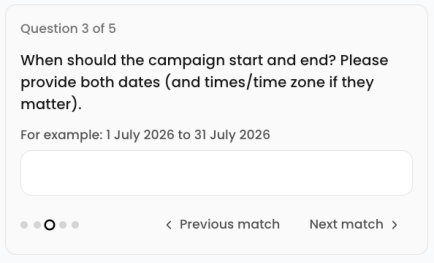
- Clarifying questions
- Entity pickers
- Display cards
- Approval cards
- Result cards
This combination of set-based workflows, plus structured UI, is the core of the argument. It’s also where the speed gain comes from: the admin stays in one flow, moving from intent to inspection to action, instead of navigating across multiple screens.
Traditional UI is still better for exploration and discoverability. It helps admins learn what the platform can do. Chat is strongest once the admin already knows the outcome they want and needs the fastest path from intent to action.
Our design principles
1. Design for sets, not records.
The core admin loop is usually list -> inspect -> select -> mutate. If the system is designed around one-record-at-a-time interactions, it will feel unnatural for real admin work.
2. Be entity-based
There are existing entities (campaigns, events, content etc.) on the platform. By making sure all of these are treated as ‘entities’ in chat, it means that anything you can do to one entity (display to user, select from a list, inspect changes), can be done to any entity.
3. Pair chat with a minimum structured admin UI
Set-based admin tasks need generic structured surfaces for exploration, selection, approval, and review.
4. Let tenants own their governance
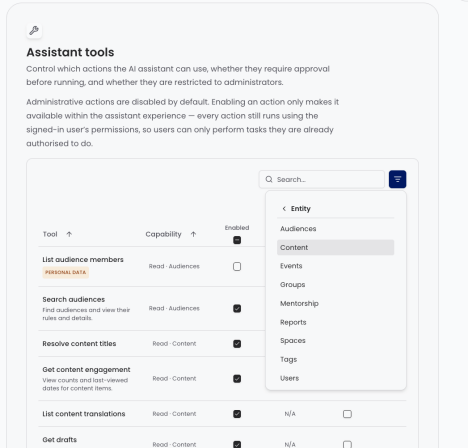
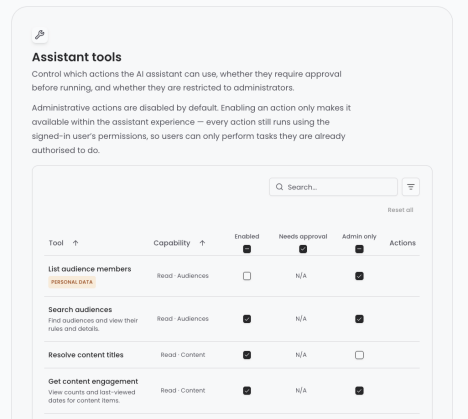
We are multi-tenant, and tenants do not share a risk appetite. We added a tool policy layer wherein tenants can decide which tools are active, if they are admin-only and if they require approval.
5. Treat state as a core part of the system
The state is not just chat history. It includes pending approvals, pending clarifications, handles, tool outcomes, and resumable execution state.
6. Make mutation tools return clear, structured change details
CRUD tools should expose enough structured result data for the UI to render approvals, result cards, and audit history.
7. Keep the same authorisation boundary as the product
The agent should act as the signed-in user against the same product APIs and permissions model as the UI. A tool being enabled is not enough, that user must have the permissions to perform the underlying actions on the platform.
How we implemented that bar
Tenant-owned governance
The problem: How to give admins control over which tools can run for their tenant, and in which scenarios.
We provide three flags configurable by admins for each tool:
- enabled
- requiresApproval
- adminOnly
This gives admins fine control on what both they and their learners can do with Kiki.
On top of that, we set high-risk tools to ship disabled by default, and combined this tool governance layer with the existing user auth boundary for API operations.
Set-based interaction model and structured UI surfaces
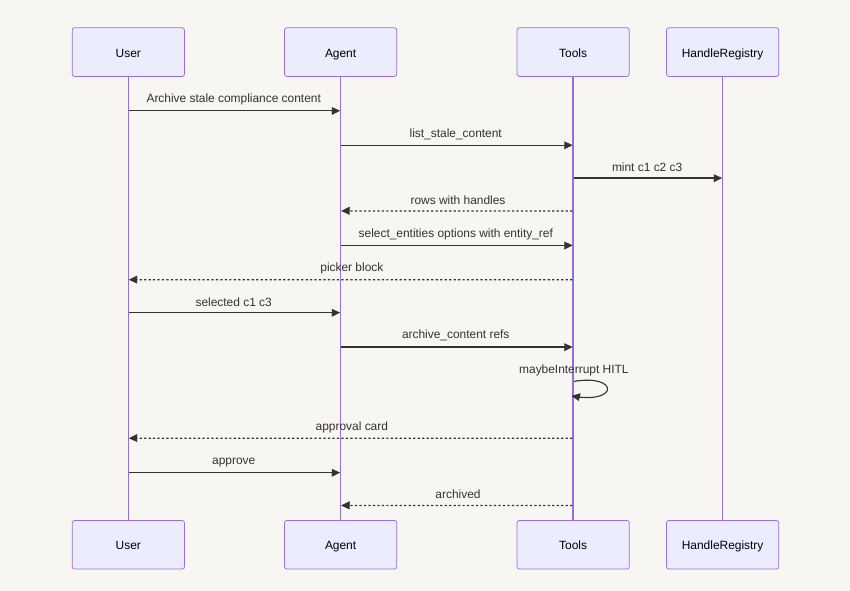
Treating admin work as set-based, the interaction model became much clearer. The canonical flow is:
- Intent - User message
- Search - AI performs a search
- Inspect - User reviews the results
- Narrow - User optionally sub-selects the results
- Approval - AI proposes a change, User reviews the change & approves/declines
- Review - User can see the changes made in the tool history
These are the generic UI requirements needed to make set-based admin work. In practice, that gave us a small reusable surface area:
- Q&A Input - Faster user input
- Entity Picker - Get user’s choice from a list of entities
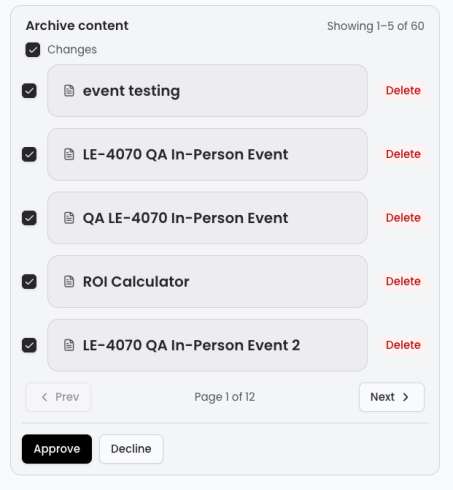
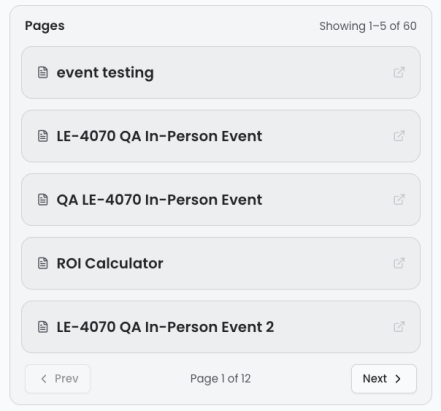
- Display Cards - To display individual or lists of entities
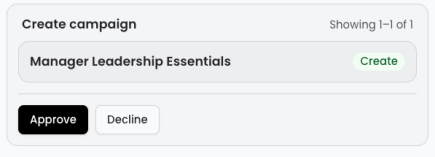
- Approval Option - to gate risky mutations
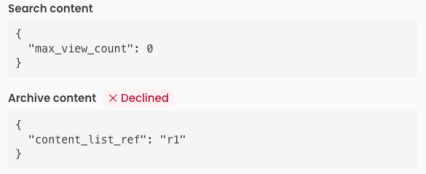
- Tool History - to show what happened
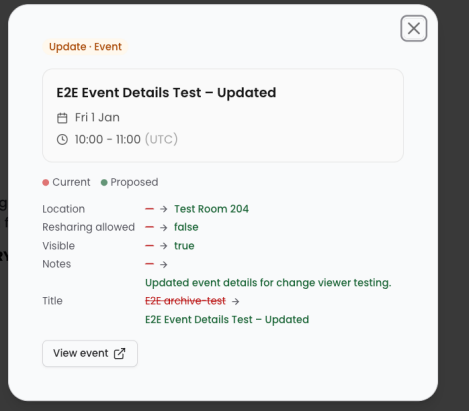
- Change window - For reviewing changes
Conversation-scoped handles as an embedded design pattern
Once the workflow spans multiple steps over a result set, a reference problem appears immediately. The conversation needs a compact way to point at entities across multiple turns. Raw UUIDs are expensive for models, awkward for humans, and brittle in long conversations.
Conversation-scoped handles solved that by giving the model a local reference system:
- u1, c3, e2, a1, t4, tg1
- Stable within a conversation
- Mapped back to real IDs inside the resolver layer
- Safe to pass across multi-step workflows
It improves latency, reduces hallucination and improves the user experience.
Metadata as the CRUD-to-UI contract
The problem: 57 tools in the catalogue change something, and each one needs an approval card an admin can actually read.
Our tools declare what they are about to change instead. The tool performs the domain operation; the metadata tells the product how to present the change set to the admin. Because it's tool owned, if we want to add a new tool, or a new entity, we only need a new tool file.
describeChanges: ({ userId, role, display, currentNormalizedRole }) => ({
  operation: 'UPDATE',
  entityType: 'user',
  items: [
    {
      id: userId,
      title: display,
      card: {
        __typename: 'PersonCardBlock',
        id: userId,
        ref: userId,
        displayName: display,
        role: currentNormalizedRole ?? null,
      },
      before: { role: currentNormalizedRole ?? 'unknown' },
      after: { role: normalizePlatformRole(role) },
    },
  ],
}),
P.S. How we built the tool catalogue quickly
This is not the main story of this blog, but it is one of the most useful engineering tactics behind the pace of implementation.
The leverage in agentic programming is not that the model types faster. The leverage is that it can translate structure that already exists.
If a problem has already been solved somewhere in the codebase, the model can help transfer that structure into a new implementation without losing the important invariants. In that sense, agentic programming is a form of information transfer.
In this project, that showed up in tool creation.
Once we had…
- An existing GraphQL surface
- A clear tool template
- Design patterns given above established
…creating new admin tools became much more like structured translation than greenfield engineering. Mapping the existing frontend operations existing in our API gateway into the tool format we designed.
- API schema -> tool input/output shape
- Existing tool pattern -> new domain operation
- Policy pattern -> correct approval/admin-only settings
- Implementation scaffold -> testable tool
The key guardrail was that success was not subjective. The exit criteria were concrete:
- The tool matched the existing GraphQL schema
- The lifecycle contract was respected
- The e2e contracts passed
We solved the problems for a few tools, our coding agents scaled it to 100+ tools.
Your admins know what they need to get done. Now they can just say it. See Kiki in action.