
Now live for 5 million+ learners worldwide
Language Selector on Login & Sign-Up Pages
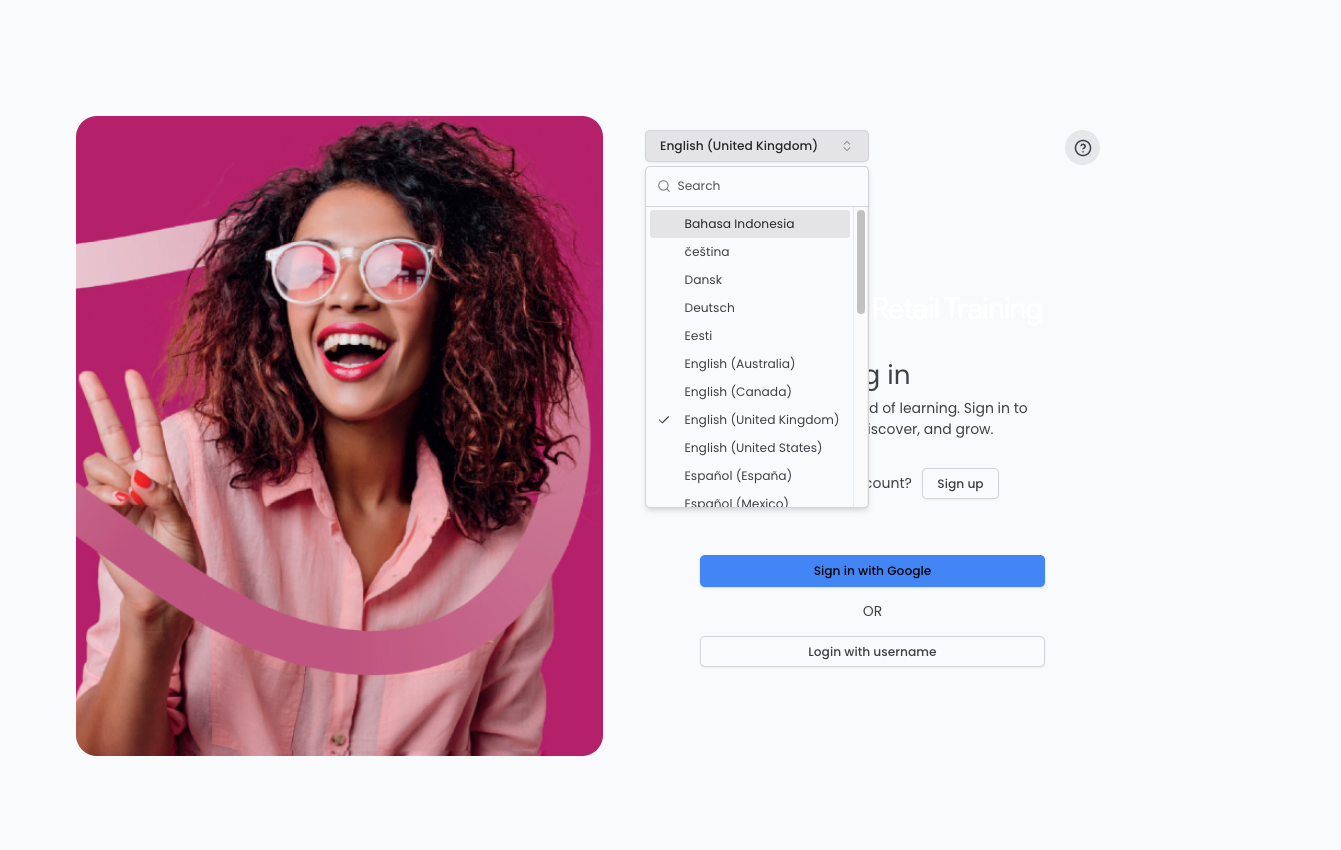
Learners can now pick their language on login, sign-up and password pages, with the browser language detected automatically.
Released
Platform
Basics
Overview
Authentication pages previously only rendered in English, even though the platform fully supports many languages once a learner is logged in. This release adds a language selector to every pre-login page, with automatic browser language detection.
What's new
- A language dropdown on all pre-authentication pages, including login, sign-up, forgotten password and account activation
- Automatic detection of the browser's language on first load, falling back to English if unsupported
- Learners can manually override the detected language at any time before logging in
Why / benefits
- Non-English-first learners are no longer blocked by an English-only login screen
- The platform meets the learner in their language from the very first page
- Fewer support tickets about not being able to read the login page
How it works
- A learner lands on a pre-login page, which renders in their browser's language if the tenant supports it, otherwise English
- The learner can change the language using the dropdown, and every other pre-login page honours the same choice
- Once logged in, the platform switches to the learner's saved account language
Use cases
- A learner whose first language differs from English reads and completes the login and sign-up flow in their own language before ever reaching the platform.
People/personas
- Non-English-first learners get an inclusive first impression from the very first page
- Support teams see fewer tickets from international rollouts and new tenants in non-English regions
Better ways to power learning
Explore the latest feature releases and get even more from Thrive.
