Meet Kiki, the AI agent built into your LMS

You don't need a team of agents, you need The Agent, built in at no extra cost.

Working alongside

Built for the people behind the platform

Kiki analyses performance, creates content and automates admin 23x faster than a Platform Pro. Kiki works in the background saving you up to 5 days a month, so your team spends less time running the platform and more time on the people using it.

Skip the dashboard and get the answers

Kiki scans your dashboards and surfaces insights on compliance, engagement and performance. Spot gaps in seconds, not spreadsheets.

Exceptional content ready in minutes

Type a prompt or upload a file, Kiki turns it into a finished course, quiz, or interactive module. No blank page, no starting from scratch, just an extra creator on the team.

Prompts that can complete a thousand tasks

Enrol an office, chase every straggler, archive years of clutter, all from one sentence to Kiki. She has over 1000 ways to handle the admin so your team never has to touch a spreadsheet again.

Built to power
better learning

Wherever your people are, whatever they need, Kiki has an answer. A question, a nudge, a bit of coaching, always on hand.

One tab. One answer.

Kiki searches your content, your connected systems and even SCORM, then gives you one answer, not a list of links to click through.

Coaching that actually changes behaviour

Kiki doesn't just mark it complete. She asks the follow-up question, checks it landed, and pushes for real understanding, not just a tick in a box.

What should I learn next?

No dashboard to check, no plan to build. Kiki just guides them, based on their role and what they've already done.

"Kiki (or Ask Albee) has been such a positive addition to our platform. It is a way for our very time poor deskless workforce to get answers immediately in the flow of work... It has given them the confidence to have conversations they maybe were not comfortable having before."

Nick Winfield
Global Field & Retail Training Manager at Avon

A Kiki for every team

One agent, helping solve every team's challenges.

Kiki pulls the answer from your knowledge base, connected systems and even your tickets, in one search. Kiki can help draft the reply, flags the SLA risk and coaches the agent live, so escalations and handle time go down.

Ask Kiki for objection handling, competitor comparisons or last quarter's win rate, mid call. Kiki preps reps before the meeting and coaches them through the pushback live, helping turn your newest reps into your top closers.

Every "can I carry over holiday", every onboarding step and overdue module, answered by Kiki before it reaches an inbox. Kiki flags stale content and skills gaps in seconds, handing L&D teams back up to 5 days worth of admin a month.

A manager, trainer and product expert in every pocket, on every shift. Kiki coaches a till operator through a return, a warehouse picker through a process and a care worker through a protocol question, all without leaving the floor.

Kiki reads every policy, update and learning completion record, and shows exactly where the gaps are and who's behind. Kiki flags audit risk weeks before the auditor does.

What AI in an LMS should actually do

Kiki is Thrive's AI agent, built into an AI native LMS. You don't pick a mode. Kiki reads your question and switches roles automatically. All in a prompt's work.

AI in LMS: what Thrive's AI agent Kiki does as Coach, Creator, Analyst, Admin and Assistant
Role What Kiki does Ask Kiki
Coach Quizzes learners, runs roleplay scenarios and guides with questions rather than walls of text. Adapts to each response in real time and nudges learners to practise new skills after a module.

"I've got a contract negotiation tomorrow. Can we practise?"

Kiki: plays the other side of the table, then asks what you'd do differently next time

Creator Turns your documents and ideas into courses, quizzes and scenarios with AI content creation, ready to review and publish in 74 languages.

"Turn this returns policy into a five-minute course with a quiz, in English and Spanish."

Kiki: builds both versions, ready for you to review and publish

Analyst Answers learning data questions in chat for admins and managers. Maps completion by region, tracks engagement by team and spots compliance gaps before they become problems.

"Which teams in the London office are behind on the latest regulatory training?"

Kiki: ranks every team by completion and flags who's overdue

Admin Handles platform admin in plain language, from users, roles and audiences to tags and archiving. Scheduled agents run tasks automatically, with a full audit trail you can undo.

"Archive anything no one's opened since 2024 and tag the rest by department."

Kiki: done in seconds, with every change logged and reversible

Assistant Gives cited answers from your learning content, SCORM files and connected systems like SharePoint, Google Drive, Confluence and Notion using Connector Search. Every answer is tailored to the person asking, based on their role and skills.

"What does our travel policy say about booking business class?"

Kiki: finds the answer in SharePoint, with a link to the exact section

The AI learning platform
everyone else is chasing

Search every connected system, read every SCORM file, run Thrive from ChatGPT, Claude, Copilot or Gemini and vibe code your own learning. All available from day one.
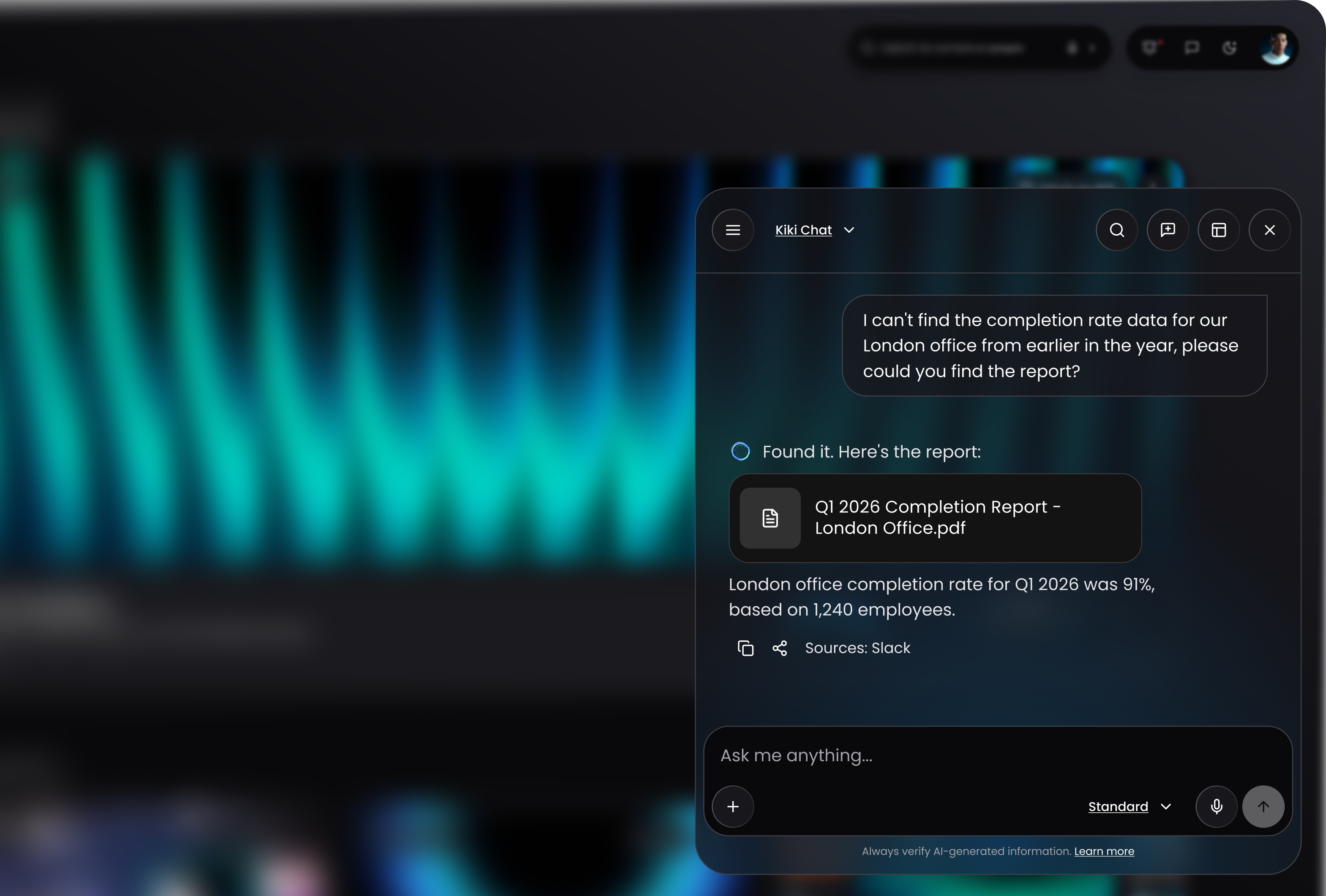
Search everywhere at once.

Microsoft, Salesforce, Slack, Google. Kiki searches every system linked to your Hub in one query. One question, one answer, one tab.

Thrive's AI assistant Kiki using Connector Search to find a completion rate report on request, with a summary of the results
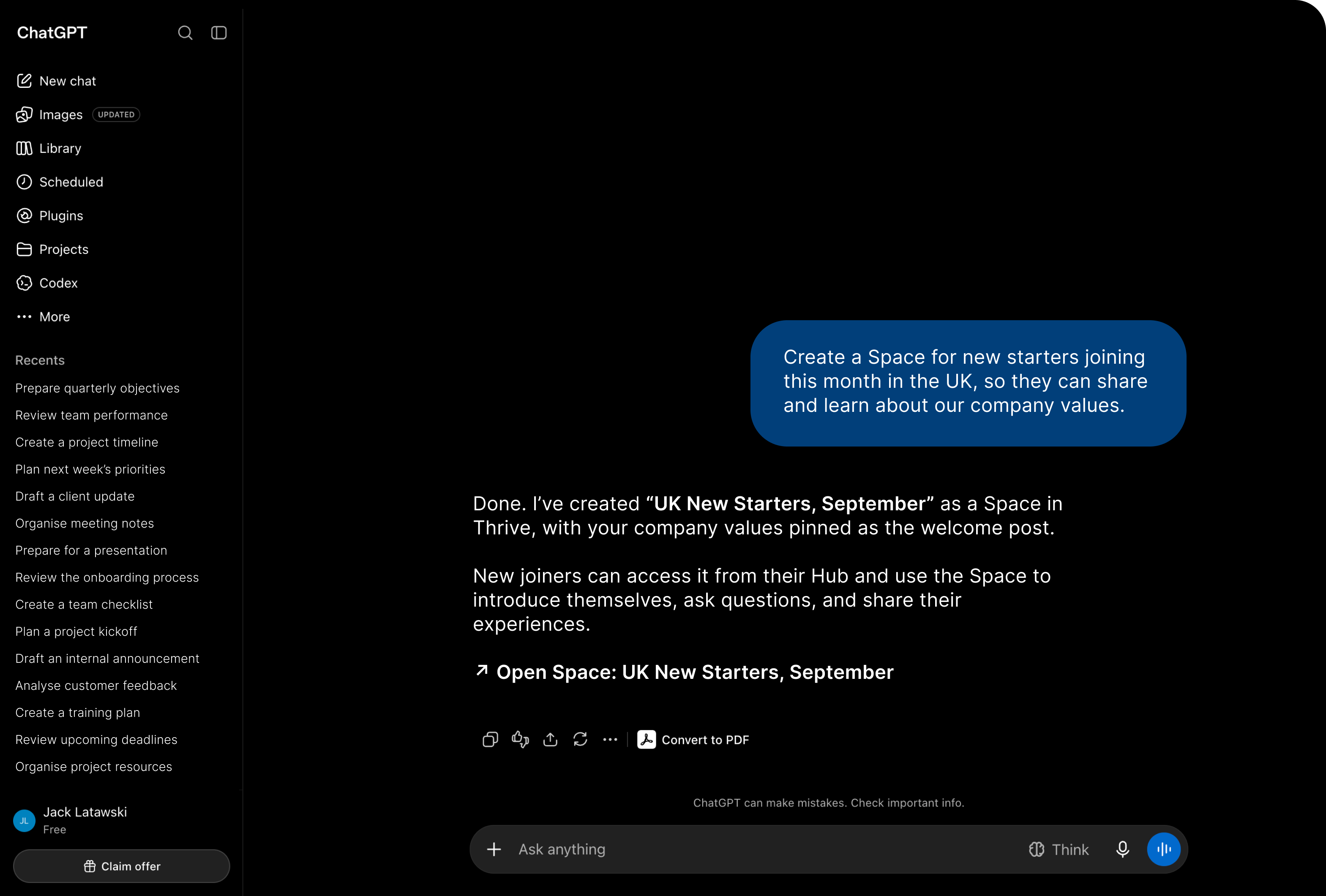
Manage Thrive from your AI tool of choice.

Enrol teams, pull reports and build pages and Spaces without leaving ChatGPT, Claude, Copilot or Gemini. No extra login, nothing new to learn, just ask.

Thrive's MCP server in action: ChatGPT creating a Space for UK new starters, letting enterprise teams manage Thrive from their AI tools
Rediscover your SCORM content.

That SCORM library gathering dust? Kiki opens every file, reads what's inside and makes it searchable in seconds. Years of content you already paid for, finally working again.

Thrive's AI assistant, Kiki, summarising the top five points of a PCI-DSS SCORM module alongside the course page
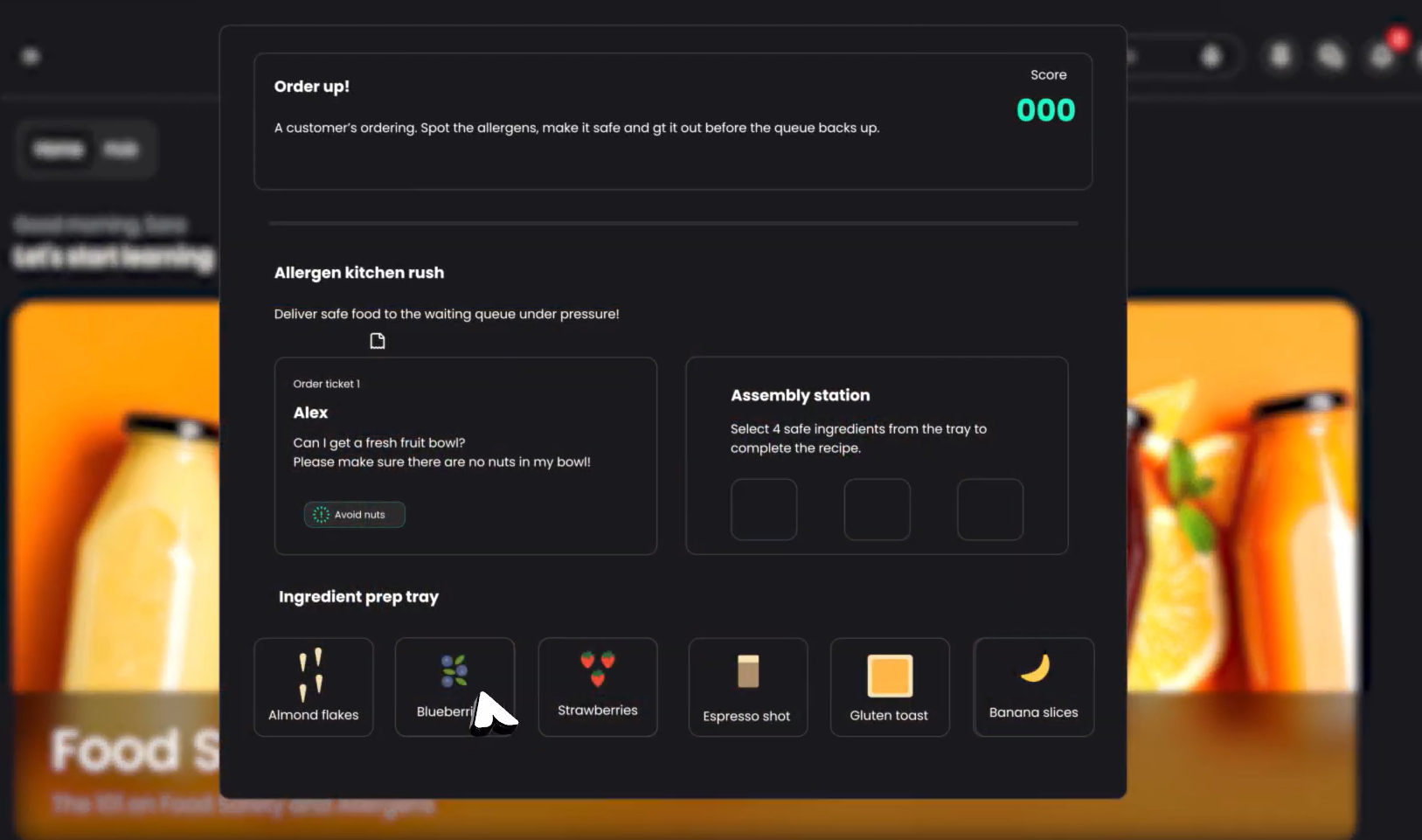
Vibe coding for L&D.

Type "a sorting game for data protection" and watch it build itself. Quizzes, scenarios, games and timelines from one prompt, then tweak the design in plain English until it's exactly right. No developers required.

Interactive allergen training game in Thrive, where learners build a nut-free order from an ingredient tray against the clock

"A really good product, a really good showcase of what's possible, and really good collaboration with you guys over at Thrive. We've been very lucky."

Ronnie Clark
Skills Academy & Leadership Development, British Airways

See Kiki in action

Because the only thing better than talking about Kiki is showing you Kiki.

FAQs about your new
AI powered learning agent

What is Kiki AI?

Kiki is Thrive's AI agent, built into the Thrive LMS at no extra cost. She coaches learners, builds courses, answers data questions, handles platform admin and finds answers across your connected systems. You don't pick a mode, Kiki reads your question and switches roles automatically.

Is Kiki an AI powered learning assistant?

Yes, and more. Kiki gives every learner an AI powered learning assistant that recommends what to learn next, summarises content and answers questions with citations. But she's also an AI agent that takes action, from building courses with AI content creation to running platform admin for your L&D team.

What's the difference between an AI agent and an LMS chatbot?

A chatbot answers questions. An AI agent answers, recommends and completes approved work. Kiki works across five roles: coaching people through real scenarios, creating learning from your source material, analysing learning data, handling platform admin with 85 tools covering 1,000+ admin actions, and finding cited answers across your connected systems. Your admins control what Kiki can access and do, and every admin change needs approval and is logged in an audit trail. Read more on our security page.

What can Kiki do?

Kiki has five roles. As Coach, she quizzes learners and runs AI roleplay to practise new skills. As Creator, she uses AI content creation to turn a prompt or a PDF into a course with quizzes, videos and games. As Analyst, she answers questions about your learning data with charts. As Admin, she handles bulk tasks using 85 tools covering 1,000+ admin actions. And as Assistant, she gives cited answers from your content, SCORM files and systems like SharePoint and Notion.

What is the best AI powered LMS platform?

Thrive is an AI powered LMS with Kiki, an AI agent built into the platform as standard. Unlike competitors who bolt on third-party AI or charge extra, Thrive includes AI powered search, content creation, coaching and admin automation at no additional cost.

Can people talk to Kiki by voice?

Yes. Talk to Kiki and she'll talk right back, on any device, including the Thrive mobile app. Your people can ask a question or rehearse a tough conversation with AI roleplay without typing, which is ideal for frontline and deskless teams who are rarely at a desk.

What is the best AI for corporate learning?

Kiki by Thrive is an AI agent built directly into your LMS at no extra cost. Unlike bolt-on tools, Kiki works with your existing content to deliver answers, coaching, content creation and admin automation in one platform. Kiki is fully brandable, multilingual and available as standard.

Can Kiki create training videos?

Yes. Kiki's AI Content Creator can generate short training videos right inside your courses, alongside quizzes and interactive games. Once your admins switch video generation on, creators can add video to any lesson without filming or editing, then review it before publishing in any of Thrive's 74 languages.

How does Kiki compare to other AI learning tools?

Unlike standalone AI tools or bolt-on integrations, Kiki is natively built into Thrive. Kiki works with your existing content, learns your brand and delivers answers, coaching and content creation without switching platforms. Competitors like Sana (now part of Workday), Cornerstone, Docebo and SAP Litmos rely on third-party AI or charge extra for AI features.

Can Kiki run AI roleplay training inside our LMS?

Yes. Kiki's AI roleplay is built into Thrive, so there's no separate tool to buy or integrate. Learners can rehearse a 1:1, a tough customer call or a sales pitch, and Kiki asks reflective questions afterwards. Because it lives inside your LMS, roleplay sits right alongside your courses, SCORM content and learning pathways.

Can I control which Kiki features my learners can access?

Yes. You can toggle Kiki's functionality on or off for learners within your platform's AI feature settings, giving you full control over what your people can and can't use.

Can Kiki help with AI sales coaching?

Yes. Kiki preps reps before a meeting, plays the customer so they can practise objection handling, and quizzes them on product knowledge. Reps can also ask for competitor talking points or last quarter's win rate in the moment, so new starters get up to speed faster. See how teams use Thrive for sales enablement.

How can AI agents help HR teams?

Kiki answers everyday HR questions, like holiday carry-over or onboarding steps, before they reach an inbox. She flags overdue compliance training and skills gaps, and HR teams can set up agents that run admin tasks on a schedule, with a full audit trail. That can hand L&D and HR teams back up to five days of admin a month.

What is the best AI platform for L&D teams?

Thrive is built for L&D teams, with Kiki included as standard rather than as a paid add-on. One platform covers AI coaching, content creation, analytics and admin, alongside mentoring, Spaces and Hub. Thrive is trusted by 500+ organisations across 60+ countries. See Kiki in action.

What languages does Kiki speak?

Kiki automatically talks to each person in their primary language, and will switch if they ask. Thrive supports 74 languages, and Kiki can auto-translate the content she creates so your admins can review it before publishing.

What is an MCP server and how does Kiki use it?

MCP (Model Context Protocol) lets AI tools connect directly to other platforms. With the Thrive MCP, admins can manage their whole platform from Claude, ChatGPT, Microsoft Copilot or Gemini, and learners can find and complete learning without leaving the AI tools they already use.

Does Thrive train AI models on our data?

No. OpenAI and Google, the providers behind Thrive's AI features, don't use your data to train their models, and neither does Thrive. Thrive also doesn't actively include personal information, such as names, in AI prompts. Read more about how Thrive keeps your data safe on our security page.

Who controls Thrive's AI features?

Your admins do. A Super Admin can switch each AI feature on or off, choose whether it's available to all users or admins only, and restrict Kiki to endorsed content only, so AI answers come from content your team has approved.